
Options Menu
Super Smash Bros Brawl Walkthrough and Guide
by SPV999
Super Smash Bros Brawl - Options Menu
From the main menu, select options.
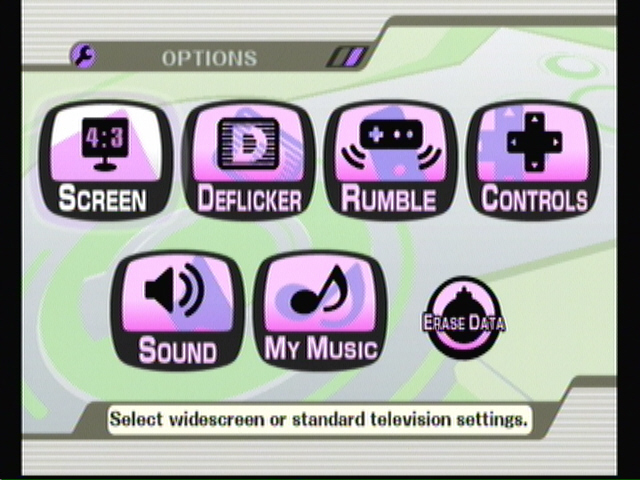 Options Menu |
You will have the following settings:
Screen
Deflicker
Rumble
Controls
Sound / Sound test
My music
Erase data
Screen
Here is where you set the Widescreen or Full screen option. Odds are, if you have a widescreen TV, you know you have a widescreen TV and how to use it.
Just in case you don’t, select the one that the circle in the background is actually a circle. If it’s an oval or some other shape, you’ve got the wrong setting.
Deflicker
I’ve never heard of this, but toggling it on and off will make the screen either razor sharp and more detailed or smoother and easier on the eyes. Try toggling it on and off and see what you like best.
Rumble
Turn the rumble on and off for all connected controllers, or for logged user names. Remember that the classic controller doesn’t have rumble
Sound / Sound test
Adjust the volume of the games music versus the sound effects. The more the bar is to the right, the higher the music will be, more to the left, higher the sound effects.
From here you can also select sound test. In here you can play over and over your favorite music from stages and the sound effects of all the characters you’ve unlocked.
Erase Data
Seriously, why would anyone want to use this setting? You can individually clear save data for certain areas in the game, or just erase the entire save file. Again, I have no idea why you would want to do this.
My Music
Here you can set the likelihood of a song being played on a particular map. That is, every map as a certain number of songs pre-set to it (some of which will be locked). These songs will randomly play every time you play the stage. In this menu, you can choose the likelihood of a certain song being played on that map. The farther right the bar, the higher the chance. You can unlock more songs by finding the CD Item in any game mode.
Cheats, hints, walkthrough index


how do you make it more violent
Play enough matches (about a 1000 i think)
How can you get jiglypuff without beating tabuu?