Abyss Codes - Redeem Codes for Free Shards and Potions
PC, ROBLOX
Last Updated: by Team SuperCheats
Redeem these working Abyss codes and push your in-game progress further.
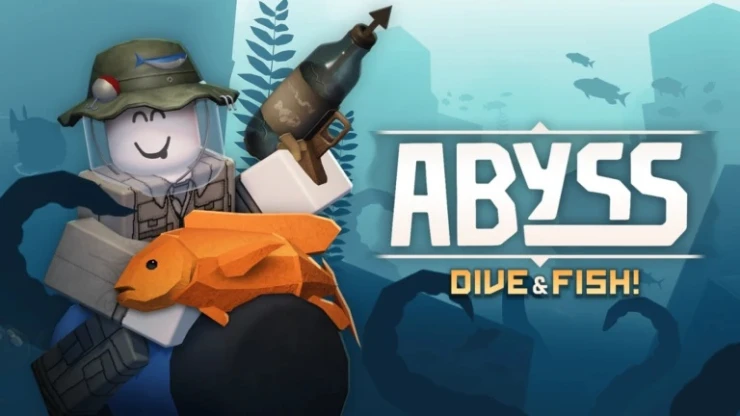
All current Abyss codes and how to use them.
Abyss (also known as Abyss: Dive & Fish) is a dark adventure game where you explore a deep, hostile abyss, fighting enemies, collecting loot, and unlocking upgrades as you descend further into increasingly dangerous areas.

Roblox Redeem Codes
Discover which other Roblox codes have been checked and updated recently.

Like to color? Find Roblox themed coloring pages on CraftyJosh.com
All Abyss Codes
You'll find all the available Abyss codes right here. They offer handy bonuses like shards and potions to help you progress further. New codes are typically released during special events, so keep an eye out for updates.
- SPORE - Redeem for 400 shards.
- SORRYDELAY - Redeem for 200 shards.
- FISHPOND - Redeem for 500 shards and double Octopus Feed.
- MONKE - Redeem for 200 shards and one strength potion.
- LOVE - Redeem for ten Valentines tickets and one love potion.
Expired Codes
These Abyss codes have now expired, but we've kept them listed for reference. Occasionally, old codes return, so if one catches your eye, it might be worth trying it again.
BUGFIX01 | RELEASE
How to Redeem Abyss Codes
You can redeem codes in Abyss easily by following these steps:
- Launch Abyss in Roblox.
- Tap the cogwheel button on the left of the screen.
- Scroll down to the 'Codes' section.
- Input a code into the 'Enter code...' text area.
- Tap 'Redeem' to claim your reward.
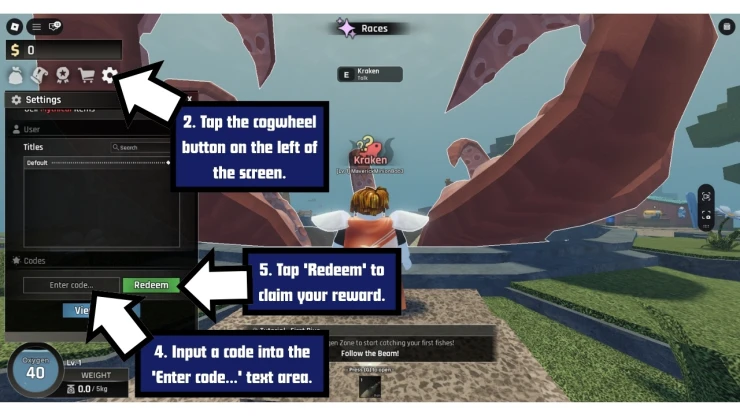
How to Redeem Abyss Codes
If you experience any issues inputting a code, check that it hasn't expired and that you have entered it correctly - keep in mind that codes are sometimes case-sensitive so it is recommended that you copy and paste the code whenever possible.
Troubleshooting Abyss Codes
If you find the code isn't working, it could be due to any of the following reasons.
- The code may have expired: Some codes only last a few days or weeks or are tied to limited events.
- Watch your typing: Codes are sometimes case-sensitive, so copy and paste if you can. Watch out for additional spaces before or after the code.
- You might have already used the code: Abyss codes are only good for one use per account. You can't you claim the same code multiple times with the same account.
- Region locked: From time to time, codes are only available in a specific region.
- Server error: You may get a server error message when trying a code. If you do, try to redeem the code another time later.
A few Roblox games that have recently dropped fresh codes include Cultivation Dao Online, Dino Hunters, Iron Soul: Dungeon, Land or Die, and Fisch.
We've also checked some of the most popular Roblox games for new codes recently, including Animal Hospital, Grow a Garden 2, and Fish It.
Find even more Roblox Redeem Codes here to grab the latest freebies before they expire.
Helpful Abyss Links
Codes can drop at any time, so they're easy to miss. Here are a few simple ways to stay on top of them.
These include engaging with the game's community by following the developers' Roblox Group and regularly checking the game's Discord page. You can also get the latest stats on the game on their RoMonitor page.
If you liked this article and found it helpful, please bookmark our page to easily return for more codes in the future.
If you want some more free rewards you may also be interested in these Roblox games that have also recently had some code updates:
Have a question for Roblox Abyss?

