Fix My Phone Codes - Redeem for Free Rewards
ROBLOX, PC
Last Updated: by Team SuperCheats
Redeem Fix My Phone codes for free Cash and other rewards to help your progress.
Roblox Fix My Phone codes to claim free rewards
Fix My Phone is a Roblox simulation where you repair broken phones, replace screens, customise devices and run your own repair shop. Use Fix My Phone codes to claim free Cash boosts, phone cases and Lot Keys to help grow your business.
⚙ In this Guide
Active codes Expired codes How to redeem Fix My Phone codes Troubleshooting Fix My Phone codes Fix My Phone tips Helpful Fix My Phone links
Roblox Redeem Codes
Discover which other Roblox codes have been checked and updated recently.
All Fix My Phone codes
☑ We last checked for new Fix My Phone codes on 23rd October, 2026
- RELEASE Copy
Redeem for Double Cash (15 minutes).
- NOBUBBLES Copy
Redeem for 1 Bubble Pop Rare Case.
- FIXIT Copy
Redeem for 1 Lot Key.
Expired Fix My Phone codes
There are no expired codes.
How to redeem Fix My Phone codes
Here are the steps to redeem Fix My Phone codes.
- Launch Fix My Phone in Roblox.
- Open your in-game phone.
- Tap the 'Codes' (Ticket) button at the bottom of your in-game phone screen.
- Input the code into the 'Enter code' text area.
- Tap 'REDEEM' to claim your reward.
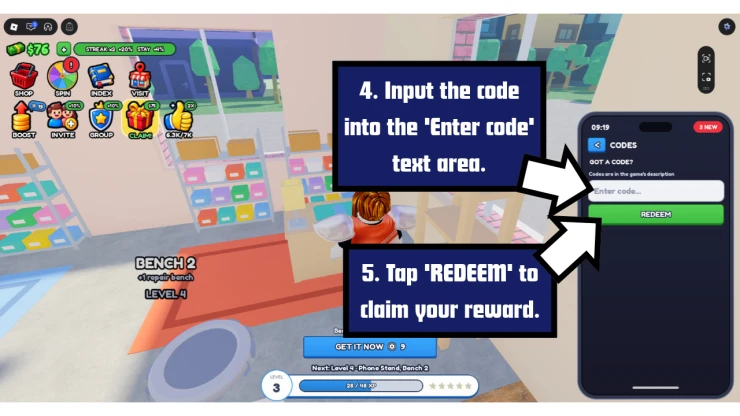
Screenshot by SuperCheats.com. Code Entry Screen
Troubleshooting Fix My Phone codes
There could be a number of reasons why the codes you have tried are not working.
- Check the code carefully: Make sure you've entered the code correctly and there are no extra spaces before or after it.
- Watch your typing: Roblox codes can be case-sensitive, so copy and paste them if you can.
- The code may have expired: Some codes stop working after a limited time and can no longer be redeemed.
- You may have already used the code: Fix My Phone codes are usually only good for one use per account.
- Check the game version: Make sure you are playing the correct version of Fix My Phone, not a different game with a similar name.
All Fix My Phone Tips
- Follow Every Step When Repairing a Phone
When fixing a phone, work through each repair step in order. Remove the broken glass, fit the new screen, peel off the protective film and clean the display. Apply the screen protector and use the squeegee to push air bubbles towards the edges. Finish by turning on the phone to test it. Some repairs also involve removing screws and replacing the battery, so follow the steps shown for each job.
- Buy the Case Shelf for Customer Orders
Check what each customer wants before finishing a repair. Some orders require a phone case as well as a working phone. The Case Shelf costs $25 and unlocks the Pink Cloud case, which you need for the first customer. Make sure you select the requested case to complete the order.
- Use Cash Bonuses to Earn More Money
You can boost your earnings by joining the game's official group and playing with friends. Group membership gives you 10% extra cash, while each friend in your server adds another 10%, up to four friends. Roblox Plus gives you an extra 20%. If all these bonuses apply together, you can earn up to 70% extra cash. This can help you save for shop upgrades faster.
- Hire Technicians and Add More Benches
You don't have to repair every phone yourself. Hire technicians to work on repairs while you handle other jobs, and buy extra benches so you can work on more phones at once. As you earn more money, you can also unlock areas such as the showroom, makeover studio and refurb room. Expanding your shop gives you more ways to work with and customise phones.
- Haggle Over Trade-Ins and Find Rare Phones
Trade-ins give you another way to make money. Haggle over the price of a phone, repair it and sell it for more. You can customise phones with spray paint, laser engraving and gems, or open Job Lots to find phones for your collection. Keep an eye out for rare phones and check the weekly themes for limited-time cases. The rarest phone has a reported one-in-10,000 chance of appearing, so don't expect to find it quickly.
A few Roblox games that have recently dropped fresh codes include Last Stop, Anime RNG Defense, Legend of Mushroom, X-Clash, and Roblox Nightfall.
We've also checked some of the most popular Roblox games for new codes recently, including Scream And Run, Anime Zero, and Build a Dungeon.
Find even more Roblox Redeem Codes here to grab the latest freebies before they expire.
Helpful Fix My Phone links
There are various social accounts to keep up to date on the latest developments and codes for the game. Here are the links.
- Roblox Group - Here is the link to the game's Roblox Group: Fix My Phone Roblox Group.
- Discord - Get help with the game on the Discord page.
- X.com - Get the latest news from the developer on the game's X.com page.
- RoMonitor - Get the latest stats about the game on the Fix My Phone page.
If you are happy with our page and found our article useful, please consider bookmarking us so you remember to find us again in the future for more Roblox game codes for this game and others.
If you want some more free rewards you may also be interested in these Roblox games that have also recently had some code updates:
Have a question for Fix My Phone?

