The Sims 3 3DS Cheats and Tips
Last Updated: by Dennis
The Sims 3 for 3DS is a single-player life simulation game released in 2011. Among other things, The Sims 3 for 3DS features a Create-A-Sim mode which gives your Sim a unique and distinct personality and allows you almost unlimited customization. Also released on the DS, the 3DS version offers a lot of improvements over the DS version thanks to the superior graphical processor found in the 3DS. Another big difference is the number of available traits, for some reason the 3DS version has 16, while the DS version has 30. Keep reading for some Sims 3 3DS cheats and tips.
The Sims 3 3DS Cheats and Tips
Have a look at the cheats and tips below to find out how you can fulfill your Sims desires, and control their lives within a living neighborhood.
Unlock Karma Powers
In The Sims 3 for 3DS you are able to unlock new interactive Karma Powers with Karma Points that will enable you to unleash amazing effects on your Sims. To unlock these Karma Powers you need to accumulate the required amount of Lifetime Happiness for each one and then go the specified location below to trigger the corresponding Karma Power by clicking on the object described.
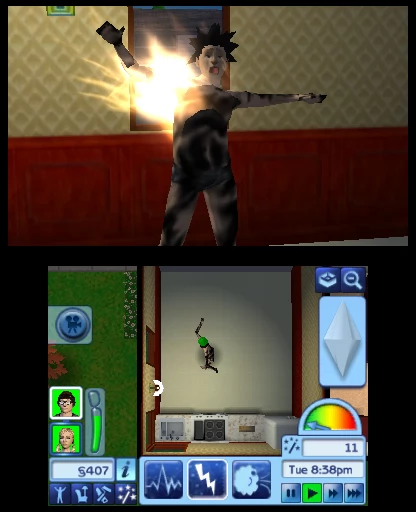
Getting some bad Karma!
- Muse
Painting in the Art Museum
- Winter Wonderland
Alcove near the Stadium
- Wormhole
Potted flower outside Poet's Abode
- The Riddler
Jet statue near Military Base
- Bless This Mess
Garden Gnome outside Landgraab house
- Casanova
Dance Club, near the restrooms
- Cosmic Curse
Graveyard at night only
- Epic Fail
Statue at Goth's house
- Giant Jackpot
Bench near the Lighthouse
- Super Satisfy
Wrought Iron Trellis off path near Lighthouse
How to Use Karma Powers
You can only use karma powers when you have enough points. Karma Points are earned by completing wishes. There are 3 different types of Karma. Earthquake, Lightning and Wind. The earthquake makes the lower screen shake and cash in money bags fall from the sky. Each Cash in Money Bag contains about 100 simoleons. The earthquake can also cause things like sinks, tvs, showers, etc. To break. It can also cause fire (depending on how strong it is used and only on your home lot). The Lightning Karma Power lets you control other sims including yours. You can do a variety of things depending on how strongly you make the power. You can electrocute sims, energize them, go turbo, nauseate, shock etc. And lastly, the wind. It causes a windstorm. Causing trash to be blown over the place and maybe a bad smell. To access Karma Powers tap on the stick with little stars icon. (it is right below the info icon). You can only use the powers when game is in play. It will not work if you're game is paused. More information on How to use Karma Powers
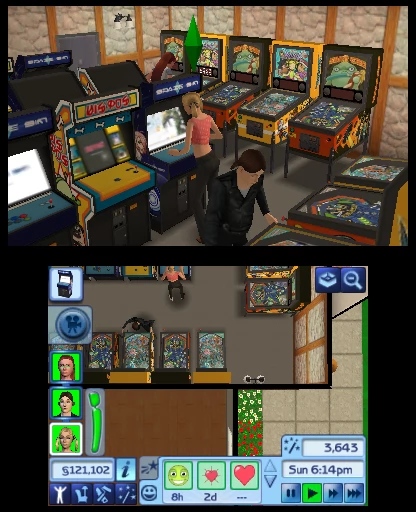
Fun times to be had in the Arcade
Easy Money
The following trick will enable you to get money easily in The Sims 3 for 3DS. It is advised that before you attempt it you save the game. Begin by entering 'Buy' mode and selecting the most expensive item you can afford. Once you have purchased it place it where you want. Now select the 'Items' tab on the right side of the screen so you are returned to the page you bought your item from. The item you previously bought will still be selected. Do not press anything except the 'Purchase' button. You will now discover that the game will still allow you to purchase the item again even if you can't afford it. You can keep repeating this trick to continually buy the desired item so you can then sell it for money. Once you have accumulated a lot of money this trick will no longer work.
Get Max Skills
In the Sims 3 on 3DS your Sims can learn skills by performing associated actions, using objects that are designed for use by that Skill. We have a Max Skills page which will show you a trick that will enable you to get max Skills for them.

Guide
Have a look at our The Sims 3 Guide if you need further help. The guide has a ton of useful information that will help you, this includes walkthroughs for Create-a-Sim and Build Mode.
Browse through loads of Sims 3 Questions - There are 300 asked, and 1000 answers - If you need to know something in The Sims 3, our Q&A pages are the great place to explore, and if your answer is not there, you can add your own.
More The Sims 3 3DS Cheats and Tips
We have 5 cheats and tips on 3DS. If you have any cheats or tips for The Sims 3 please send them in here. We also have cheats for this game on : PC : Mac : Xbox 360 : Nintendo DS : PlayStation 3 : Wii : iPhone/iPad : Android
You can also ask your question on our The Sims 3 Questions & Answers page.
All The Sims 3 Cheats and Tips - Latest First.
Get max skills ! For your sims !
Lets get started,please follow this cheat carefully.
If you don't understand this cheat please leave a comment and well reply.
For this cheat you well need 2 sims in your household
Step 1 go to the library or in your own bookshelf.
Step 2 choose the skill book you would like to master and make your sim go and get it and wait till he/her sits down and the blue skill bar appears.
Step 3 when your sim is sat down and the blue skill bar appears and make your other sim go next to the sim that is reading.
Step 4 put the game on pause and then make the sim who is standing up go to his/hers mobile and click chat then put the game on fast forward and then when it says select sim do not press anything.
Step 5 now all you have to do is wait about 5 minutes without pressing anything and you can watch the blue skill bar of the own who is reading from the own on the phone.
Well that it hope this helps you. I'm french spike,
And if you don't understand this cheat please tell me in the comments and well reply !
Get rich quick
Go to the store and purchase the most expensive thing that you can afford.then place it.after you place it go back to the store and purchase that item again.(The game will still let you purchase it even if you can't afford it).buy as many as you want.then sell all of the things you bought,keep doing this until you have a lot of money.
You don't have to go to the store
If you have an item at home and it's from the store and it's in the storage buy something first before you take that item out of storage. Put the item in your house. Then go to storage and click on the item from the store and put it in your house. After that go back to the buying section and select buy on the item that is highlighted. Then it will charge you the same amount of money that the item is that you took out of storage.
How to make alot of money without a job
First you go into furniture or build mode and buy what you can afford thats the most money. Then put that into storage. Then keep buying it again and again until you can't buy anymore or until you don't want to.(If you don't have enough room in storage then put them all over your house. Then go into the inventory and sell them all unless you want to keep them. Just to let you know once you sell all your items don't do it again unless you have the right amount of money. (I used the wall flat-screen) I hope this helps you.
Money
Buy the same object over and over till you have no more money left once your money reaches to zero keep buying tht same product don't click on none other product stay on the same product once you think you have lots of that same item go to remov e mode the delete all those products when all deleted yu will have more money than you did b4 hope it works
http://www.youtube.com/watch?v=bOIKC7DmSjM
The Sims 3 FAQs
We have 1130 questions and 2547 answers for The Sims 3. Check them out to find answers or ask your own to get the exact game help you need.
| How do you get into build and buy mode |
First you launch the game. Then you figure it out |
| Toggle between sims. How do you switch between family Sims? |
On the keypad at the top of the wii remote, press down and a row of all your sims should appear and you can scroll along to choose your sim, then click A while on the sim you want to play and you will be teleported to them |
| How to change seasons in PS3 sims3. I want to know on PS3 just to be clear. |
Sims 3 seasons is only available on PC, mac, not on PS3, Xbox, Xbox 360. Sorry about this but I'm afraid there is no seasons for this platform |
| Who else is in the town (sim wise) and where do they live? |
Some of the Sims don't actually live in the town and you can't visit their houses. You can invite them over by clicking on your phone, 'call friend', scroll down the menu to the sim you want to call, call them and you can choose to talk to them or invite them over. There is another option to see where they live, and that is to click 2 to bring up the map, then on 'friends' and if their friends live in town their house will be displayed in green. For some reason this sometimes doesn't work, even if they live in town, but it's worth a try. |
| How to get your 'romantic interest' to move in sims3 wii |
The only way is to be friendly with them and do the one time options like 'ask about day' and 'ask about career' until it says 'ask to move in', then they will just move in. Hope this helps! |
Can you help answer any of these questions?
Have a question for The Sims 3?
The Sims 3 Walkthroughs
We have 4 Walkthroughs for The Sims 3.
By XafineGardening Guide (PC)
By WarfreakWalkthrough (PC)
By Rivid22Trait Guide (PC)
By cubbiecoCareer Guide (PC)
Click here for all walkthroughs




The Sims 3 Getting Started Guide
A complete guide to The Sims 3, covers getting started and finding your way around Sunset Valley, ..
Top pages for this game

