Run a Restaurant Codes - Active Codes for Free Rewards
ROBLOX, PC
Last Updated: by Team SuperCheats
Use these working Run a Restaurant codes to make your game progress a little easier and more fun.

All current Run a Restaurant codes and how to use them.
Run a Restaurant is a Roblox tycoon and management game where you build, customize, and expand your own restaurant. Hire staff, serve customers, earn profits, and upgrade your business to attract more guests and create the ultimate dining destination.

Roblox Redeem Codes
Discover which other Roblox codes have been checked and updated recently.
All Run a Restaurant Codes
We've collected every Run a Restaurant code that's active at the moment. These codes reward you with helpful in-game items to support your journey. New codes tend to appear during events, so don't forget to check back regularly.
- FISHIES - Redeem for 1 Captain's Wheel (NEW).
- RAR4EVER - Redeem for a fancy painting.
Expired Codes
There are no expired codes for Run a Restaurant.
How to Redeem Run a Restaurant Codes
You can redeem codes in Run a Restaurant easily by following these steps:
- Launch Run a Restaurant in Roblox.
- Tap on the 'Settings' (Cogwheel) button in the top-left corner of the screen.
- Scroll down to the 'Secret Codes...' section.
- Input the code into the 'Enter Code...' text area.
- Tap 'SUBMIT' to claim your reward.
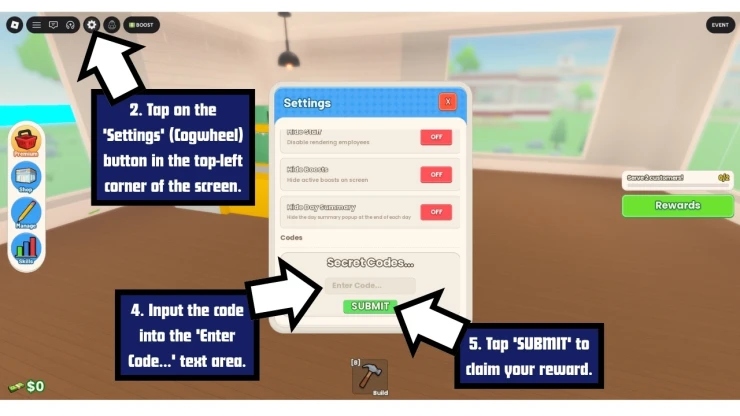
How to Redeem Run a Restaurant Codes
If you experience any issues inputting a code, check that it hasn't expired and that you have entered it correctly - keep in mind that codes are sometimes case-sensitive, so it is recommended that you copy and paste the code whenever possible.
Troubleshooting Run a Restaurant Codes
If you find the code isn't working, it could be due to any of the following reasons.
- The code may have expired: Some codes only last a few days or weeks or are tied to limited events.
- Watch your typing: Codes are sometimes case-sensitive, so copy and paste if you can. Watch out for additional spaces before or after the code.
- You might have already used the code: Run a Restaurant codes are only good for one use per account. You can't you claim the same code multiple times with the same account.
- Region locked: From time to time, codes are only available in a specific region.
- Server error: You may get a server error message when trying a code. If you do, try to redeem the code another time later.
A few Roblox games that have recently dropped fresh codes include Jujutsu Shenanigans, Anime Girl RNG, Last Stop, Iron Soul: Dungeon, and Driving Empire.
We've also checked some of the most popular Roblox games for new codes recently, including Kaiju Alpha, The Hunt: Roblox 20, and Search for the Needle.
Find even more Roblox Redeem Codes here to grab the latest freebies before they expire.
Run a Restaurant Tips
Below are some tips that will help you to progress faster in the game.
- Start with a small restaurant layout. It is easier for customers and staff to move around without getting stuck.
- Keep your kitchen close to the dining area so food gets delivered faster.
- Make sure there is enough space between tables so staff can move around freely.
- Don't spend all your money on decorations at the start. Focus on upgrades that help you earn more cash.
- Buy extra tables early. More seats mean more customers and more money coming in.
- Hire waiters as soon as you can. They save you a lot of time and keep things running smoothly.
- Upgrade your chef whenever possible. Faster cooking means less waiting for customers.
- Watch how customers move around your restaurant. If they get stuck, rearrange your furniture.
- Collect your earnings often. Letting money sit there doesn't help your progress.
- Save up for better appliances instead of buying lots of small upgrades.
- Try different table layouts to find what works best for your restaurant size.
- If customers are leaving before being served, focus on improving waiter and chef speed.
- Invest in items that increase customer numbers. More visitors usually means more profit.
- Use automatic workers whenever possible. They make earning money much easier while you focus on upgrades.
- Check the shop regularly. Special items sometimes appear that can help your restaurant grow faster.
- Keep expanding steadily instead of spending all your cash at once.
- Add more floors when you can afford them. Extra space lets you fit more tables and equipment.
- Log in regularly to claim rewards and bonuses that can speed up your progress.
- Always have a goal for your next upgrade. Saving for something useful is usually better than random purchases.
- Prestige only when you feel progress has started to slow down. Doing it too early can set you back.
Helpful Run a Restaurant Links
New codes drop without warning, and grabbing them right away isn't always easy. Thankfully, there are a few simple steps you can take to stay on top of new releases.
These include engaging with the game's community by following the developers' Roblox Group and regularly checking the game's Discord page. You can also get the latest stats on the game on their RoMonitor page.
If this page helped you out, feel free to bookmark it so you can easily come back for more codes later.
If you want some more free rewards you may also be interested in these Roblox games that have also recently had some code updates:
Have a question for Run a Restaurant?

