Power a City Codes - Redeem for Free Rewards
PC, ROBLOX
Last Updated: by Team SuperCheats
Input Roblox Power a City codes to claim free rewards to help you progress faster.
Roblox Power a City codes to claim free rewards
Power a City is a Roblox city-building game where you build and expand your own city. Upgrade buildings, manage resources, and grow your city to become bigger and more powerful.
⚙ In this Guide
Active codes Expired codes How to redeem Power a City codes Troubleshooting Power a City codes Power a City tips Helpful Power a City links
Roblox Redeem Codes
Discover which other Roblox codes have been checked and updated recently.
All Power a City codes
☑ We last checked for new Power a City codes on 22nd October, 2026
- CITY13 Copy
Redeem for a reward (NEW).
Expired Power a City codes
6DOCKS | 67BLACK67 | 2MVISITS | RELEASE
How to redeem Power a City codes
Here are the steps to redeem Power a City codes.
- Launch Power a City in Roblox.
- Tap the 'Settings' (Cogwheel) button in the upper-right corner of the screen.
- Input the code into the text area next to 'Codes'.
- Tap the 'Enter' button on your keyboard to claim your reward.
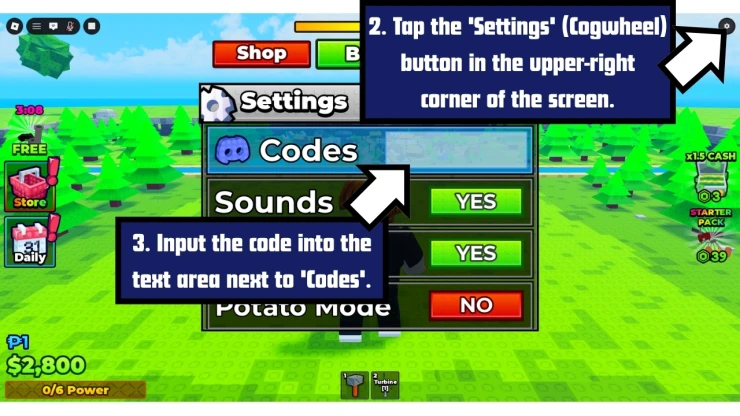
Screenshot by SuperCheats.com. Code Entry Screen
Troubleshooting Power a City codes
There could be a number of reasons why the codes you have tried are not working.
- Check the code carefully: Make sure you've entered the code correctly and there are no extra spaces before or after it.
- Watch your typing: Roblox codes can be case-sensitive, so copy and paste them if you can.
- The code may have expired: Some codes stop working after a limited time and can no longer be redeemed.
- You may have already used the code: Power a City codes are usually only good for one use per account.
- Check the game version: Make sure you are playing the correct version of Power a City, not a different game with a similar name.
Power a City tips
- Upgrade your Generators when you need more Power
- Connect your Power before expanding
- Keep your Batteries close to the city
- Don't let your Batteries stay full
- Balance Generators and Batteries
Generators create your Power, so upgrade them when your production is falling behind. Don't spend Cash on upgrades you don't need yet.
Make sure your Generator is producing Power and connected to your current village or city before you expand the grid. Getting the connection working should come first.
Put your Batteries where you can reach the city quickly. A shorter trip means you can sell your stored Power faster and get back to building.
Keep an eye on your Battery storage. If your Batteries are full, your extra Power has nowhere to go. Sell your stored Power before your storage becomes a problem.
Don't spend all your Cash on Generators. If you're producing more Power than your Batteries can hold, upgrade your storage instead. If your Batteries are often empty, more Generator capacity may be the better choice.
A few Roblox games that have recently dropped fresh codes include Tiles Survive, Last Stop, Skate Tree, Anime Girl RNG, and TR Legacy.
We've also checked some of the most popular Roblox games for new codes recently, including Capybaras VS Plants, Roblox Chess Incremental, and Tribes 3v3.
Find even more Roblox Redeem Codes here to grab the latest freebies before they expire.
Helpful Power a City links
There are various social accounts to keep up to date on the latest developments and codes for the game. Here are the links.
- Roblox Group - Here is the link to the game's Roblox Group: Power a City Roblox Group.
- Discord - Get help with the game on the Discord page.
- RoMonitor - Get the latest stats about the game on the Power a City page.
If you are happy with our page and found our article useful, please consider bookmarking us so you remember to find us again in the future for more Roblox game codes for this game and others.
If you want some more free rewards you may also be interested in these Roblox games that have also recently had some code updates:
Have a question for Power a City?

