Call of Duty Mobile Codes - Codes for Free Rewards
Android, iPhone/iPad, PC
Last Updated: by Team SuperCheats
Claim every working Call of Duty Mobile (CODM) code here to help you progress and stay alive in the game.
All current Call of Duty Mobile codes and how to use them.
Call of Duty Mobile, sometimes refered to as CODM, is a first-person shooter game that is the phone version of the console Call of Duty. The game features iconic characters and maps from the franchise.
We've gathered every current Call of Duty Mobile code here in one spot. These give you useful in-game boosts that will help you progress and stay alive. New codes for Call of Duty Mobile tend to drop during events, so regularly check for updates.
All Call of Duty Mobile Codes
Below you'll the latest Call of Duty Mobile codes, while the remain active, these will give you a few nice extras, from bonus Bloodpoints to in-game cosmetics.
- DCJRZBZQJX - Redeem for reward.
- DCJQZBZJPV - Redeem for reward.
- DCJPZBZRVD - Redeem for reward.
- BTPAZBZDSX - Redeem for reward.
- BTORZBZPW6 - Redeem for reward.
- BTONZBZCK5 - Redeem for reward.
- BTOJZBZSWW - Redeem for reward.
- BTOFZBZBNU - Redeem for reward.
- BTOCZBZNHX - Redeem for reward.
- DCLOZBZUSE - Redeem for reward.
- DCIDZBZVQU - Redeem for reward.
- DCICZBZXW6 - Redeem for reward.
- DCIEZBZFCT - Redeem for reward.
- DCIBZBZSPN - Redeem for reward.
- DCIAZBZXPS - Redeem for reward.
- DCHVZBZV9M - Redeem for reward.
- DCHTZBZMWB - Redeem for reward.
- DBHIZBZPA8 - Redeem for reward.
- DBHJZBZXU9 - Redeem for reward.
- DBHHZBZM8Q - Redeem for reward.
- DBLCZBZUEF - Redeem for reward.
- DBHFZBZKXQ - Redeem for reward.
- CUOFZBZR5M - Redeem for reward.
- CUKQZBZTMS - Redeem for reward.
- CTUJZBZJ6P - Redeem for reward.
- CTUKZBZHVS - Redeem for reward.
- CTULZBZBXP - Redeem for reward.
- CUJAZBZTUF - Redeem for reward.
- CTUEZBZUNR - Redeem for reward.
- CTUFZBZPPP - Redeem for reward.
- CTUDZBZV4T - Redeem for reward.
- CTUCZBZW6V - Redeem for reward.
- MMPREHMT95 - Redeem for reward.
- DBGOZBZD8M - Redeem for five covert crates (chance to get Vivian Harris - B.A.T Agent).
- DBDLZBZQNN - Redeem for one gilded gloves crate.
- DBDNZBZCWJ - Redeem for one gilded gloves crate.
- DBDMZBZNQP - Redeem for one gilded gloves crate.
Expired Codes
These Call of Duty Mobile codes have now expired, but we've kept them listed for reference. Occasionally, old codes return, so if one catches your eye it might be worth trying again in future events.
DAVAZBZ9EP | DAVCZBZA9M | DAVBZBZX5A | DBDKZBZQUU | DBDJZBZAJU | CTPRZBZJJH | DAVGZBZRN6 | DAPAZBZRDC | CTOOZBZ7PV | CTPRZBZJHH | CTPQZEZCJC | DAOUZBZ79N | DAMGZBZMWW | DAEDZBZGVB | DAEBZBZWPK | DAFTZBZEA5 | DAFIZBZXW7 | DAFGZBZKUJ | CUQRZBZX6D | CURDZBZTJG | CUQTZBZEUU | CURCZBZUDA | CUQVZBZ3TA | CURBZBZ6PJ | CURBZBZ6PJ | CUQUZBZBTR
Note: There are plenty more expired codes; we have just listed those that have expired recently.
How to Redeem Call of Duty Mobile Codes
Redeeming codes in Call of Duty Mobile is quick and easy. Just follow these steps:
- Launch Call of Duty: Mobile on your device.
- Log in to your account.
- Go to your profile section, and copy your User ID.
- Exit the game and go to the official Call of Duty: Mobile redemption website.
- There will be two input spaces - one for the 'UID' (User ID) and the other for the 'Redeem Code'. Fill in your respective details in the text area provided.
- Tap the 'SUBMIT' button.
- Collect the reward in your respective COD account via 'Mailbox'.
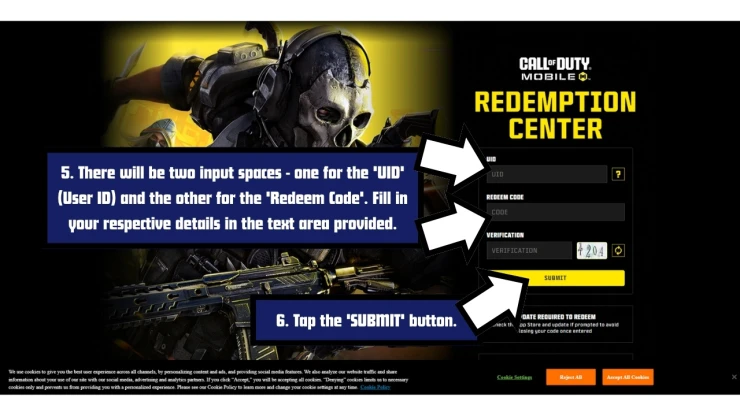
How to Redeem Call of Duty Mobile Codes
If you run into any issues, check that the code hasn't expired and that you've entered it correctly - they're sometimes case-sensitive. It's best to use copy and paste if you can.
Troubleshooting Call of Duty Mobile Codes
If a code isn't working, it could be due to any of the following reasons.
- The code may have expired: Some codes only last a few days or weeks or are tied to limited events.
- Watch your typing: Codes are sometimes case-sensitive, so copy and paste if you can. Watch out for additional spaces before or after the code.
- You might have already used the code: Call of Duty Mobile codes are only good for one use per account. You can't claim the same code multiple times with the same account.
- Region locked: From time to time, codes are only available in a specific region.
- Server error: You may get a server error message when trying a code. If you do, try to redeem the code another time later.
A few Roblox games that have recently dropped fresh codes include All Star Tower Defense, Kaiju Alpha, Pixel Lineage, Murder Mystery DUELS, and Fruit Battlegrounds.
We've also checked some of the most popular Roblox games for new codes recently, including +1 Assassin Leveling, Uma Racing, and Trade Squishy Dumplings.
Find even more Roblox Redeem Codes here to grab the latest freebies before they expire.
Helpful Call of Duty Mobile Links
There are various social accounts to keep up to date with the latest developments and codes related to the game. Here are the links.
- Discord - Get help with the game on the Discord page.
- YouTube - Take a look at the official YouTube channel.
- X Account - Find out the latest on the developer's X Account.
- Facebook - Get help with the game on the Facebook page.
If you are happy with our page and found our article useful, please consider bookmarking us so you remember to find us again in the future for more codes for this game and others.
Got a cheat or hot tip for this game? Found a secret, or a strategy for success?
Focus on Battle Pass Progresss
There are two ways in which you can get the Call of Duty Mobile Battle Pass. The free version is already unlocked for all players and contains significantly fewer rewards than the premium Battle Pass which can only be purchased using real money. Regardless of which Battle Pass you have you should focus on progressing through it as quickly as possible to gain Battle Pass XP, so you can unlock the higher tiers faster and get better rewards. The best way to do this is to take part in the events when they become available.
Use Crouch when Moving Around
Get in the habit of using crouch when you move around in Call of Duty Mobile as doing so will decrease your visible area making it harder for enemies to hit you. You may want to consider getting the Skulker perk which will enable you to move faster while you are crouched.
Use Headphones
It is recommended that you use headphones when you play Call of Duty Mobile as doing so will help you be more aware of what is happening around you and help you to stay alive longer as they will enable you to hear from which direction enemies are approaching and pinpoint where silenced sniper rifle fire is coming from. Turn the speakers up loud if you do not have headphones.
Play the Events
Play the events whenever they become available in Call of Duty Mobile to increase your rewards and Battle Pass progress. The rewards you will receive include credits, Weapon XP, Battle Pass XP, crates and sometimes new weapons, characters and skins. Events basically a series of tasks you need to complete in order to claim the reward.
Check the Gunsmith Regularly
Gunsmith in Call of Duty Mobile is a feature that allows you to customize your weapons by adding attachments and skins. To unlock a lot of the options you must play with those weapons or use weapon XP cards to level-up that weapon. Gunsmith can be found in the Loadout section and to complete some events you will need to use Gunsmith to ensure you have the right number of attachments on the right weapons to progress. This means it is important that you regularly head to the Gunsmith feature to make sure you have the correct requirements.
Call of Duty Mobile (CODM) FAQ's
Our Latest Questions
| Why does my avatar run automatically? When playing the run circle button disappears and runs autom.. |
| It’s because you run it to automatic run make you can stop how to stop run you have to jump |
Can you help answer any of these questions?
Have a question for Call of Duty Mobile (CODM)?

