Roblox Build A Plane Tips and Codes to get Free Rewards
ROBLOX, PC
Last Updated: by Team SuperCheats
Our Build A Plane Tips will help you put together a decent plane and earn plenty of cash.
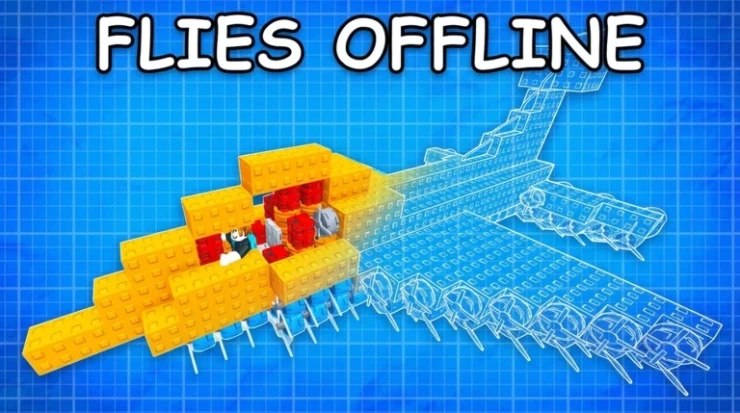
Roblox Build A Plane codes to claim free rewards
Build A Plane is a Roblox game where you can design and build your own aircraft using various parts available in the in-game shop. The objective is to create a functional plane, navigate through procedurally generated biomes, and earn cash based on the distance traveled. Use Build A Plane codes when they become available to claim free rewards to help your progress and make the game more enjoyable.

Roblox Redeem Codes
Discover which other Roblox codes have been checked and updated recently.
All Build A Plane Codes
Below you'll find every Build A Plane code currently working. These will give you a few extras that include cash.
- halloween - Redeem for 150 Candy (NEW).
- trickortreat - Redeem for 5k Cash, 100 Candy (NEW).
- spookyskies - Redeem for 2 Bat Wings (NEW).
- thunderstruck - Redeem for 10k Cash.
- eject - Redeem for 5k Cash.
- voidmap - Redeem for 2 Refined Fuel.
- bugsquashed - Redeem for 5k Cash.
- BAPISBACK - Redeem for 5k Cash.
Expired Codes
airdrop2026 | clearskies
How to Redeem Build A Plane Codes
Redeeming codes in Build A Plane is quick and easy. Just follow these steps
- Launch Build A Plane in Roblox.
- Tap the 'Shop' (Basket) button on the left side of the screen.
- Scroll down until you see the Codes section.
- Input the code into the 'Enter a Code..' text area.
- Tap the 'Enter' button on your keyboard to claim your reward.
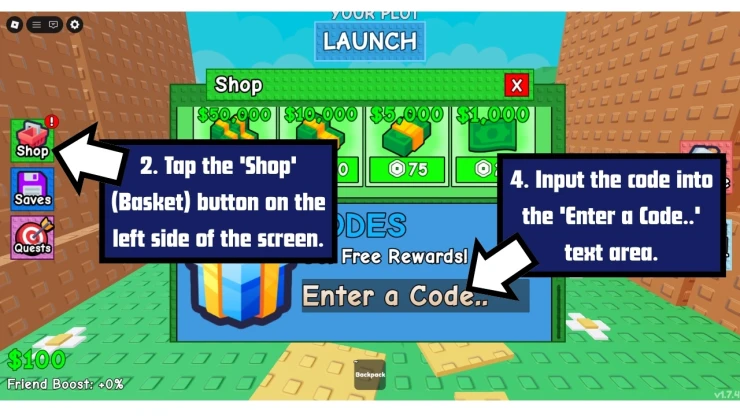
How to Redeem Build A Plane Codes
If you run into any issues, check that the code hasn't expired and that you've entered it correctly - they're sometimes case-sensitive. It's best to use copy and paste if you can.
Troubleshooting Build A Plane Codes
If a code isn't working, it could be due to any of the following reasons.
- The code may have expired: Some codes only last a few days or weeks or are tied to limited events.
- Watch your typing: Codes are sometimes case-sensitive, so copy and paste if you can. Watch out for additional spaces before or after the code.
- You might have already used the code: Build A Plane codes are only good for one use per account. You can't you claim the same code multiple times with the same account.
- Region locked: From time to time, codes are only available in a specific region.
- Server error: You may get a server error message when trying a code. If you do, try to redeem the code another time later.
Build A Plane Tips
- How do you get cash in Build A Plane?
- What is cash used for in Build A Plane?
- How do you fly further in Build A Plane?
- What happens if you hit an obstruction on a run in Build A Plane?
- What is the best way to construct a plane in Build A Plane?
- How often does the shop refresh in Build A Plane?
- How can you find out when certain items will appear in the shop in Build A Plane?
- How high can you fly in Build A Plane?
Cash is rewarded based on the distance you cover. These biomes you travel across are filled with obstacles you must navigate.
The cash you earn is used to purchase new items at the shop. These items include wings, propellers, and fuel cans.
The configuration of the plane you design dictates how much land you will be able to cover in your following runs.
Coming into contact with an obstruction will result in your plane falling apart, and you will be sent back to the beginning.
It is better to have a smaller plane; a larger plane will have a larger hitbox, which will result in making it more difficult to dodge obstructions. Ensure you balance the number of propellers with fuel cans.
The shop has an RNG-based stock system which refreshes every five minutes. Certain fundamentals that are essential will always be available in the shop. This includes things like blocks, fuel, and seats.
The only way to find out is to manually check the shop.
The altitude you can fly is determined by your airfare's configuration.
How to Maximize your success in Build A Plane
- Start Simple:
- Experiment Freely:
- Save for Upgrades:
- Leverage Offline Mode:
- Master Biomes:
- Use Mutations:
- Track Progress:
Use basic blocks like Blocks ($5) and Fuel Cans ($15) to learn how components affect flight.
With no design restrictions, try unconventional layouts to discover high-performing planes.
Prioritize rare items like Better Propeller? ($500) or Missile ($5000) for advanced builds.
Launch your plane before logging off to earn cash passively.
Learn to navigate biomes like Winter (tornadoes) and Overgrowth (trees) to fly farther.
Rare blocks with mutations (e.g., speed boosts) can give your plane an edge.
Use the Max Distance Tracker to set and achieve longer flight goals.
Build A Plane Controls
- Movement: W, S, A, D
- Jump: Spacebar
- Equip Block: Number keys 1-0
- Place Block: Left Mouse Button (with a Block equipped)
- Plane Movement (Left / Right): A, D
Helpful Build A Plane Links
There are various social accounts to keep up to date with the latest developments and codes related to the game, here are the links.
- Roblox Group - Here is the link to the game's Roblox Group: Build A Plane Roblox Group.
- Discord - Get help with the game on the Discord page.
- RoMonitor - Get the latest stats about the game on the Build A Plane page.
If you are happy with our page and found our article useful, please consider bookmarking us so you remember to find us again in the future for more Roblox game codes for this game and others.
If you want some more free rewards you may also be interested in these Roblox games that have also recently had some code updates:
Build A Plane FAQ's
Have a question for Build A Plane?

