Be a YouTuber - Codes for Free Rebirth Coins and Cash
PC, ROBLOX
Last Updated: by Team SuperCheats
Claim every active Be a YouTuber code here to boost your in-game progress.
All current Be a YouTuber codes and how to use them.
Be a YouTuber is a Roblox simulator game where you create videos, gain subscribers, and earn money to upgrade your equipment and grow into a top YouTube star.
All currently working Be a YouTuber codes are listed here. Redeeming them will earn you useful in-game boosts such as rebirth coins and cash. Since new codes often drop during events, it's worth checking back often.
⚙ In this Guide
Active codes Expired codes How to redeem Be a YouTuber codes Troubleshooting Be a YouTuber codes Helpful Be a YouTuber links
Roblox Redeem Codes
Discover which other Roblox codes have been checked and updated recently.
All Be a YouTuber codes
Listed below is every Be a YouTuber code currently working. These will give you a few extras that will help you in-game.
☑ We last checked for new codes on 29th September, 2026
- 115mvisits Copy
Redeem for 45 Rebirth Coins (NEW).
- 880kfavs Copy
Redeem for 80 Rebirth Coins.
- trading Copy
Redeem for rewards.
- 875kfavs Copy
Redeem for reward.
- golweek Copy
Redeem for reward.
- worldcup Copy
Redeem for reward.
- 115mvisits Copy
Redeem for reward.
- 850kfavs Copy
Redeem for free rewards (code prerequisite
- 450klikes Copy
Redeem for free rewards (code prerequisite
- summer Copy
Redeem for free rewards.
- 100million Copy
Redeem for free rewards (code prerequisite
- 90mvisits Copy
Redeem for free rewards.
- 400klikes Copy
Redeem for 80 rebirth coins.
- 800klikes Copy
Redeem for 80 rebirth coins.
- 80mvisits Copy
Redeem for five rebirth coins.
- underwater Copy
Redeem for 50 rebirth coins.
- 75mVisits Copy
Redeem for 30 rebirth coins.
- 350klikes Copy
Redeem for 40 rebirth coins.
- 65mVisits Copy
Redeem for 30 rebirth coins.
- 750Kfavs Copy
Redeem for 40 rebirth coins.
- 300klikes Copy
Redeem for ten rebirth coins.
- 50mVisits Copy
Redeem for ten rebirth coins.
- 200KLikes Copy
Redeem for ten rebirth coins.
- Mutations Copy
Redeem for ten rebirth coins.
- 100klikes Copy
Redeem for 15 rebirth coins.
- 50klikes Copy
Redeem for ten rebirth coins.
- 30klikes Copy
Redeem for five rebirth coins.
- 30klikes Copy
Redeem for five rebirth coins.
- 20KLikes Copy
Redeem for five rebirth coins.
- release Copy
Redeem for 250 cash.
Expired Be a YouTuber codes
There are no expired codes for Be a YouTuber.
How to redeem Be a YouTuber codes
You can redeem codes in Be a YouTuber easily by following these steps:
- Join the IM A YOUTUBER Roblox group page.
- Launch Be a YouTuber in Roblox.
- Complete a quick tutorial.
- Tap the 'Shop' button on the left of the screen.
- Scroll to the 'Exclusive Codes' section.
- Input a code into the 'Enter Code...' text area.
- Tap 'Redeem' to claim your reward.
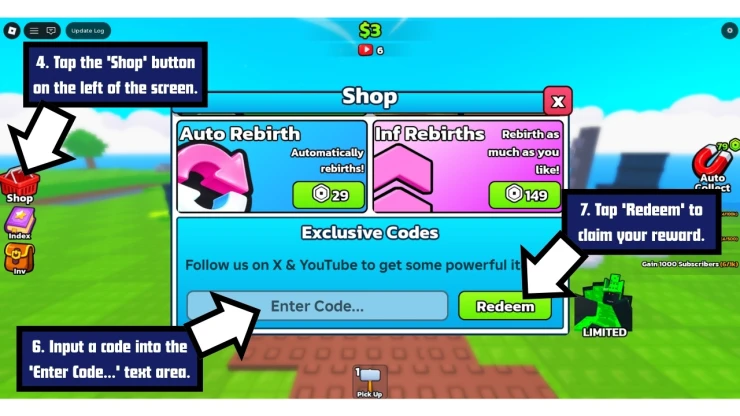
How to Redeem Be a YouTuber Codes
If you experience any issues inputting a code, check that it hasn't expired and that you have entered it correctly - keep in mind that codes are sometimes case-sensitive so it is recommended that you copy and paste the code whenever possible.
Troubleshooting Be a YouTuber codes
If you find the code isn't working, it could be due to any of the following reasons.
- The code may have expired: Some codes only last a few days or weeks or are tied to limited events.
- Watch your typing: Codes are sometimes case-sensitive, so copy and paste if you can. Watch out for additional spaces before or after the code.
- You might have already used the code: Be a YouTuber codes are only good for one use per account. You can't claim the same code multiple times with the same account.
- Region locked: From time to time, codes are only available in a specific region.
- Server error: You may get a server error message when trying a code. If you do, try to redeem the code another time later.
A few Roblox games that have recently dropped fresh codes include Drive A Kukirin, Gym Star Simulator, Cookie Run: Kingdom, Dino World, and Rogue Piece.
We've also checked some of the most popular Roblox games for new codes recently, including Slap Battles, +1 Loot Evo, and Monkey Bomb Tag.
Find even more Roblox Redeem Codes here to grab the latest freebies before they expire.
Helpful Be a YouTuber links
Codes can be released at any time, which can make them easy to miss. Luckily, there are a few things you can do to make sure you catch them as soon as they're available.
These include engaging with the game's community by following the developers' Roblox Group and regularly checking the game's Discord page. You can also get the latest stats on the game on their RoMonitor page.
If you found this article useful, saving our page is a great way to make sure you can find us again for more game codes.
If you want some more free rewards you may also be interested in these Roblox games that have also recently had some code updates:
Have a question for Be a YouTuber?

