Apple iPad Original Codes - Redeem for Free Coins
ROBLOX, PC
Last Updated: by Team SuperCheats
Redeem Apple iPad Original codes for free Coins in Roblox to unlock rewards and progress faster in the game.
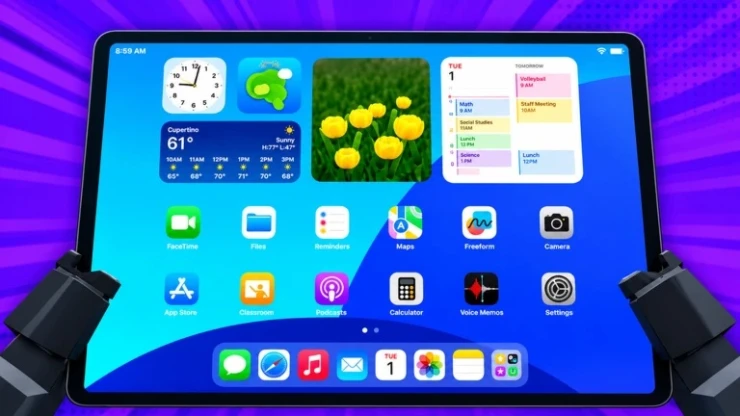
Roblox Apple iPad Original codes to claim free rewards
In Roblox Apple iPad Original, explore a virtual iPad, download apps from the App Store, and play mini-games. Redeem Apple iPad Original codes for free Coins to unlock more content and customise your device.
⚙ In this Guide
Active codes Expired codes How to redeem Apple iPad Original codes Troubleshooting Apple iPad Original codes Apple iPad Original tips Helpful Apple iPad Original links
Roblox Redeem Codes
Discover which other Roblox codes have been checked and updated recently.
All Apple iPad Original codes
☑ We last checked for new Apple iPad Original codes on 19th October, 2026
- 9MVISITS Copy
Redeem for 2.5k Coins (New).
Expired Apple iPad Original codes
6MVISIT | 4MVISIT | 1MVISIT | 900KVISIT
How to redeem Apple iPad Original codes
Here are the steps to redeem Apple iPad Original codes.
- Launch Apple iPad Original in Roblox.
- Tap the 'Codes' (button) on the left side of the screen.
- Input the code into the 'Enter code' text area.
- Tap 'Redeem' to claim your reward.
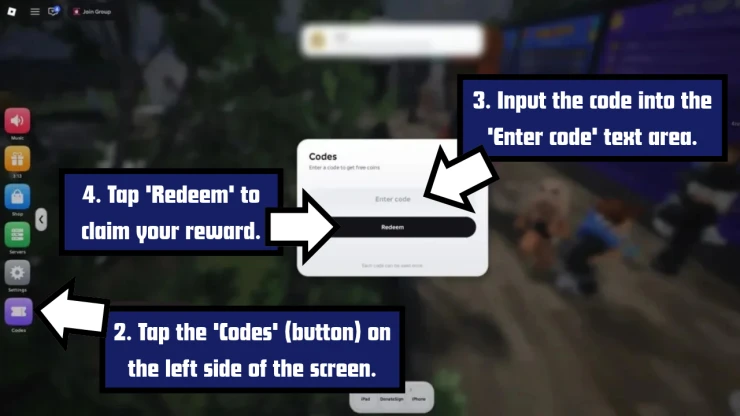
Screenshot by SuperCheats.com. Code Entry Screen
Troubleshooting Apple iPad Original codes
There could be a number of reasons why the codes you have tried are not working.
- Check the code carefully: Make sure you've entered the code correctly and there are no extra spaces before or after it.
- Watch your typing: Roblox codes can be case-sensitive, so copy and paste them if you can.
- The code may have expired: Some codes stop working after a limited time and can no longer be redeemed.
- You may have already used the code: Apple iPad Original codes are usually only good for one use per account.
- Check the game version: Make sure you are playing the correct version of Apple iPad Original, not a different game with a similar name.
All Apple iPad Original tips
- Redeem Codes for Free Coins
Click the Codes button on the left side of the screen and enter a working code. Press Redeem to claim your free Coins, which you can spend on items in the game.
- Download Apps From the App Store
Open the App Store and browse the available apps. Select an app and press Get to download it, then return to your home screen to open it.
- Try Different Mini-Games
Check out Astro Blaster, Sneak Arena, Flings, and Volleyball. Try each mini-game to find the ones you enjoy most and discover the different activities available on your virtual iPad.
- Spend Coins on Customisation
Use your Coins to unlock available device cases and titles. Check the options before spending so you can choose the items you want for your virtual iPad.
- Download Roblox From the App Store
Look for Roblox in the virtual App Store and press 'Get' to download it. Return to your home screen and open it to try playing Roblox inside your virtual iPad.
A few Roblox games that have recently dropped fresh codes include The Forge, Anime Fighting Simulator, Duel Warriors, Survive Zombie Arena, and Rogue Piece: Rebirth.
We've also checked some of the most popular Roblox games for new codes recently, including Build A Soccer Squad, First Person Boxing, and .
Find even more Roblox Redeem Codes here to grab the latest freebies before they expire.
Helpful Apple iPad Original links
There are various social accounts to keep up to date on the latest developments and codes for the game. Here are the links.
- Roblox Group - Here is the link to the game's Roblox Group: Apple iPad Original Roblox Group.
- Discord - Get help with the game on the Discord page.
- RoMonitor - Get the latest stats about the game on the Apple iPad Original page.
If you are happy with our page and found our article useful, please consider bookmarking us so you remember to find us again in the future for more Roblox game codes for this game and others.
If you want some more free rewards you may also be interested in these Roblox games that have also recently had some code updates:
Have a question for Apple iPad Original?

