Hypershot Codes - Free gems, codes and tips
PC, ROBLOX
Last Updated: by Team SuperCheats
Input Hypershot codes to get free gems and coins to help make the game more fun.
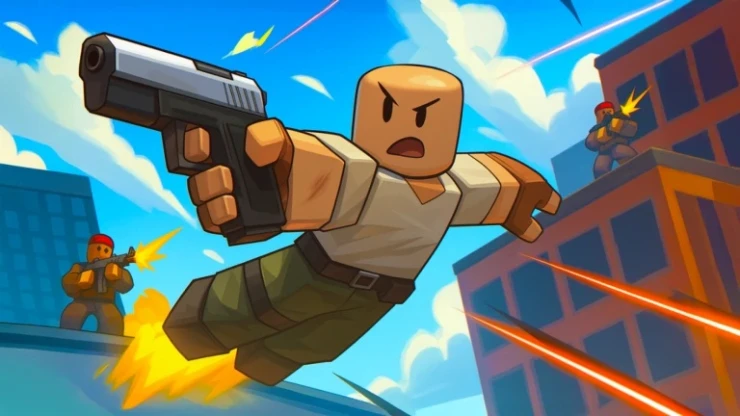
Roblox Hypershot codes to claim free rewards
Hypershot is a Roblox first-person multiplayer shooter. You are put into one of two teams to accomplish a particular objective under a time limit. This can be simply killing opponents, or extend to capturing flags, dominating hills, etc. Use Hypershot codes when they become available to get free rewards that will help you achieve your goal more easily.
⚙ In this Guide
Active codes Expired codes How to redeem Hypershot codes Hypershot tips Hypershot controls Helpful Hypershot links
Roblox Redeem Codes
Discover which other Roblox codes have been checked and updated recently.
All Hypershot codes
If you've not already tried these codes, redeem them while they are still active for free rewards.
☑ We last checked for new codes on 11th October, 2026
Expired Hypershot codes
These Hypershot codes have now expired, but we've kept them listed for reference. Occasionally, old codes return, so if one catches your eye, it might be worth trying it again.
NEWUPDATE | ONEBILLION | SIXSEVEN | HAPPYMAY | 100K | CHRISTMAS2025 | CONTRACTS | NEWUPDATE | THANKSGIVING
How to redeem Hypershot codes
Redeeming codes in Hypershot is quick and easy. Just follow these steps:
- Open Hypershot on Roblox.
- Play a match to the end to bring up the 'Free Rewards!' option at the top of the screen.
- Scroll to the bottom of the menu.
- Input your code into the 'Enter Code Here' text area.
- Tap 'Redeem' to claim your reward.
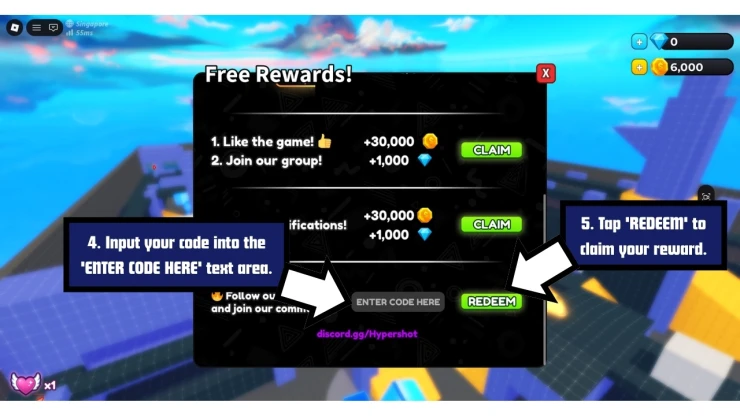
How to Redeem Hypershot Codes
If you run into any issues, check that the code hasn't expired and that you've entered it correctly - they're sometimes case-sensitive. It's best to use copy and paste if you can.
Hypershot tips
- How do you get free coins and diamonds in Hypershot? Log in daily to get rewards that include coins and diamonds.
- How do you get more abilities in Hypershot? At the start of the game you only get one free default ability for each slot. More abilities can be unlocked by spending diamonds.
- How do you get free abilities in Hypershot? During each week, two random abilities will be available to use free of cost for that given period.
- How many loadouts can you have in Hypershot? You can have a total of four loadouts, each of which can be customized.
- How do you obtain new weapons in Hypershot? New weapons can be unlocked by spending coins.
- How do you obtain coins in Hypershot? Coins can be acquired through completing objectives, playtime rewards, getting kills, leveling up, and from the daily rewards you receive when you log in. You can also get coins through microtransactions.
- How do you unlock skins for your weapons in Hypershot? Unique skins for your weapons can be obtained by opening cases. The rarer the skin, the lower its drop chance.
- How many tiers of cases are there in Hypershot? There are six tiers of cases; the rarer the case, the higher chance you have of acquiring rarer skins.
- Wooden
- Bronze
- Silver
- Gold
- Diamond
- Mythical
- How do you claim your playtime rewards in Hypershot? These are rewards given to you by the game for playing for a certain length of time. You can claim your reward by clicking on the gift box option at the top of the screen.
- How many game modes are there in Hypershot? Game modes include:
- Capture the Flag
- Team Deathmatch
- Free For All
- 1v1
- 2v2
- Gun Game
- How do you adjust your crosshairs in Hypershot? You can edit the crosshairs of your weapon by selecting the 'Edit' tab in 'Setting'.
Hypershot controls
- Move: W, A, S, D
- Look Around: Move the Mouse
- Aim down sights: Right Mouse Button
- Fire Weapon: Left Mouse Button
- Sprint: Left Shift
- Ping: Z
- Inspect: V
- Interact: G
- Reload: R
- Zoom: Left Alt
- Primary Weapon: 1
- Secondary Weapon: 2
- Knife: 3
- Check Scoreboard: Hold Tab
- Melee: F
- Emote: B
- Settings: K
- Slide: C
- Ability 1: Q
- Ability 2: E
- Ability 3: X
Helpful Hypershot links
There are various social accounts to keep up to date with the latest developments and codes related to the game, here are the links.
- Roblox Group - Here is the link to the game's Roblox Group: Hypershot Roblox Group.
- Discord - Get help with the game on the Discord page.
- X Account - Find out the latest on the developer's X Account.
- YouTube - Take a look at the official YouTube channel.
- RoMonitor - Get the latest stats about the game on the Hypershot page.
If you are happy with our page and found our article useful, please consider bookmarking us so you remember to find us again in the future for more Roblox game codes for this game and others.
If you want some more free rewards you may also be interested in these Roblox games that have also recently had some code updates:
Hypershot FAQ's
Can you help answer any of these questions?
| You should add a setting where you can add parts to your gun |
Have a question for Hypershot?

