The Sims 3 PC Cheats and Tips
Last Updated:
The Sims 3 on PC is an open-world life Simulation game that is set in the Sunset Valley and Riverview neighborhoods. We have an extensive collection of The Sims 3 cheats for PC and tips that will enable you control their lives within the neighborhoods they live as you focus on their short-term and long-term desires. The Sims games are best experienced on a PC along with a traditional keyboard-and-mouse combination setup for input. This is because the game is played from an aerial, isometric perspective. The PC verison of The Sims 3 also features a Command Console that enables you to enter a series of cheats.
The Sims 3 Cheats PC
Our tips and cheats which includes the PC exclusive Command Console codes will help your gameplay as you go about your day to day life in Sunset Valley and Riverview.
Create a Sim
The Create-a-Sim mode (CAS) in The Sims 3 allows you to create a sim to look like whoever you want. To find out more about this feature and how it workds check out our Create-a-Sim guide.
Buy Mode
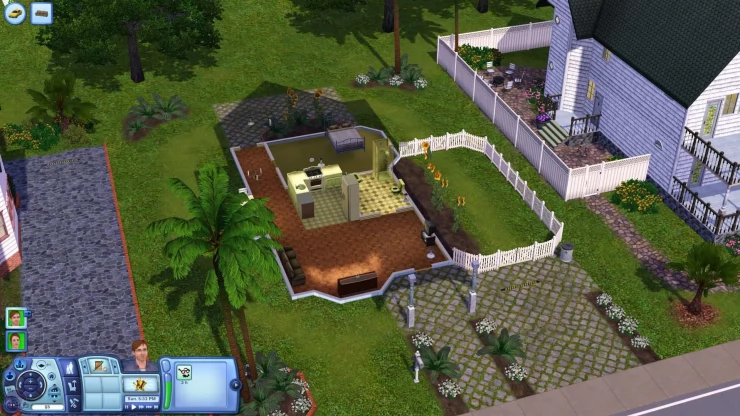
In The Sims 3 for PC Buy Mode allows you to make use of the cash your Sims earn. Check out our Buy Mode gude to find out what you can purchse.
 .
.Buy Mode
Get Promotions Faster
You can help your Sim get promotions faster by sending them to work in a good mood, when their Fun bar is high it will help them to use the work hard action more often, causing the promotion bar to rise faster.
Raising Skills Cheat
In the PC version The Sims 3 you can enter the following cheat to keep your Sims from getting tired, hungry, or stressed. To enter the cheat press Control + Shift + C to open the Sim's 3 Command Console and type 'testingcheatsenabled true' (without the quotes) .
The Sims 3 Console Command Cheat Codes
To access the Sims 3 Command Console you need to press Control + Shift + C. If the code has been entered correctly a box will appear in the top left of the screen. This is the Command Console where you type the cheats below (without the quotes), then press Enter. If you are using Windows Vista you will need to press Control, Windows and the Shift button along with 'C' to make the Command Console appear. Once you have typed the cheats press the 'Escape' key to close the Command Console.
- Enables Testing Cheats (such as shift-click mailbox):
Type 'testingcheatsenabled true'
- Gives the Household $1,000 Simoleons:
Type 'kaching or rosebud'
- Gives the specified amount of money to the household with that last name:
Type 'familyfunds lastname amount'
- Fix a Sim who cannot Move:
Type 'resetsim firstname lastname'
- Hides the Plumbob and any Speech Bubbles.
Type 'hideheadlineeffects on'
- Lets you Buy anything, including Locked Objects such as Pangu's Axe (World Adventures):
Type 'buydebug'
- Allows you to Place Objects anywhere:
Type 'Moveobjects on/off'
- Ages up a Sim into a Non-Controllable NPC who lives in your household. Works on children:
Type 'AgeuptoNPC on'
- Gives you a Random Joke:
Type 'jokeplease'
Game Guide
Check out our The Sims 3 Guide to get a full guide on all the different features of the game, these include skills, relationships, jobs, families, and Build mode.
More The Sims 3 PC Cheats and Tips
We have 58 cheats and tips on PC. If you have any cheats or tips for The Sims 3 please send them in here. We also have cheats for this game on : Mac : Xbox 360 : Nintendo DS : 3DS : PlayStation 3 : Wii : iPhone/iPad : Android
You can also ask your question on our The Sims 3 Questions & Answers page.
All The Sims 3 PC Cheats and Tips - Most Popular First
The Sims 3 Cheats
While the daily-grind, hard work and associated rewards are noble ways to go about building your Sims a happy and fruitful lifestyle, there is no Sanbox mode in The Sims 3 which allows you to simply build a dream house and live a life of leisure and luxury with no constraints. Some of the building tools are also restricting, confined to a grid and not allowing complete control over object placement. EA have generously provided a heap of cheats, some very useful and some merely humorous to ease these potential limitations.
All traditional cheats in the game must be entered via the game's 'console' or command line. To activate it, press CTRL+SHIFT+C together (Vista users may need to do CTRL+SHIFT+WINDOWS+C). You will then see the screen darken and a blue bar appear at the top wh..
Tips
These are not traditional cheat codes, but they do influence the game in a similar way.
Aging:
You can stop your Sims from aging without cheating. In the options menu simply uncheck the Aging box. Use the Lifetime slider to slow down the aging process, making a potentially longer (or shorter) game for your Sims.

Use the options to 'legally' stop your Sims from aging or slow the process down
Free Items:
Anything you buy can be resold on the same day for the price you paid for it. As long as you have the cash to begin with, you can effectively 'borrow' items, use them, for reasons such as to upgrade your Sim or m..
Best cheat ever
Hi I'm going to show you all how to have alot of money without a job
1st.you have to press the Shift,Ctrl,and C at the same time then let it go
2nd. There going to be a box in the top of the screen
3rd. In that box type in testingcheatsenabled true
Then press enter
4th.Then Press the same thing Shift,Ctrl, C same time
5th. Type in the box 1st Familyfunds (your family's last name) Then Type the amount of money you want
Trust me it works !!
Any questions Ask me .
Thumbs up if it worked for you
Dirty Dishes
If you want to get rid of dirty dishes and you do not have a dishwasher you can drag empty plates into a Sim's inventory and then drag it to 'Sell'. You will not make any money doing this but it gets rid of the dirty dishes quickly without your sim having to waste time doing them.
Increase Chance to have Boy Babies
If you have a pregnant female Sim eat apples you will increase their chances of having a boy.
Increase Chance for Multiple Births
You can increase the chances of your sim having twins or triplets by having one or both parents have the lifetime reward of Fertality Treatment.
Listen to your Music on the Sim Radio
You can pick your own audio to play while your Sims listen to the radio or CD player in game via the Custom Radio channel. To do this, browse to My DocumentsElectronic ArtsThe Sims 3Custom Music (or your computer's equivalent) and replace or add to the tracks within. Make sure you access the Sims folder via 'My Documents' or 'Documents' on Vista and not the one you may find through Program Files, as that does not appear to work.
These folders also have the names of some of the tracks included with the game, if any take your fancy. You can upgrade the stereo in game if your Sim is handy enough, allowing your favourite tunes to bellow throughout the entire plot!
Watch your Videos on the Sim TV
This can be done by putting the video you want to watch into the '/My Documents/EA Games/The Sims 3/Movies/Broadcast/(television station)' folder and switching on the television in the game. The video must be in .AVI format with a maximum resolution of 128x128 pixels and a frame rate no more than 15 frames per second.
Increase Chance to have Girl Babies
If you have a pregnant female Sim eat watermelons you will increase their chances of having a girl.
Make money quick
First open your cheat bar by pressing ctrl shift and c all at the same time then type in motherlode and click enter then you have 50,000 simoleons
Works more than once
Duck Time Moodlet
If you purchase the Ducksworth of Bathington and place it in your bathtub a Sim will get the Duck Time moodlet which results in a +15 boost for four hours when they take a bath.
Clothes
Buy a dresser from 'Buy Options' and click 'Plain Outfit' to get new clothes. You will be able to put a total of three different clothes for each type (formal, every day, athletic, etc.)
Sims need some lifetime happiness points? Well here's how you ge
For as long as I can remember, it has been relatively hard for me to find this cheat! So I want to make it easy for you guys.
STEPS {In order of when done}
1.) Launch The Sims 3 (For any EP as well}
2.)When you go to the MAIN SCREEN use your keyboard and hold these three keys : ctrl+shift+c : Now, a blue bar should come up.
3.)Type in : testingcheatsenabled true : The EXACT way I did it, no caps. Don't forget, you HAVE to put a space after the "testingcheatsenabled" then type true.
4.)Press enter
5.)Click your game you want to play ( Or make a new one if you'd like.)
6.)Wait for your game to load...
7.)On the sim's tab , click the treasure box.'
8.)Look down, you should see a Treasure Box,..
Vampire Fish
Hi! Some of you were wondering: I read the fishing for dead book, but I can't find a vampire fish anywhere! I have the answer! Go to the grave yard (at any location)there should be a pond. There should also be a black fish. Put your bait on your line and throw it to the spot where the black fish is. You Sshould catch THE VAMPIRE FISH!!! (sorry this is not really a cheat but it still works)
The Sims 3 (Cheat Codes)
To get the cheat bar you simply need to type:
CTRL+ALT+C
help - Display most cheats
Kaching - 1,000 more Simoleons
Motherlode - 50,000 more Simoleons
shazaam - +2,500 lifetime happiness points to active Sim
freerealestate - Ignore the cost when buying a lot
modify traits - Set or clear traits
add to household - Add active Sim to current household
[color=red]set age [number][/color] - Set age of the Sim
edit in cas - T..
Motherlode
If you push Ctrl,Shift,C and type motherlode spelled like that you get 50,000 dollars for your Sims. You can do it more than once.
Simoleons
Enter ctrl+alt+C, enter Motherlode get 50,000 Simoleons
Becareful when having a birthday party
I had the unfortunate experience of my kid growing up too fast. When it was time for the baby to have a birthday, I set it up so the sim would take the baby to the cake to 'grow up'... But unfortunately I did it twice and the baby grew to be a elementary school kid... Bypassing the child stage and now has bad habits...
Not fair!
Lifetime happiness Cheats
When you start the game at the main menu press [Ctrl] [Shift] and the C key. A blue rectangular box will appear at the top of the screen, type in testingCheatsenabled true. Don't capitalize anything except the C in cheats.
Then load your game before you start to play do the same thing you did at the main menu screen then go to the chest and click it. When you click it you will see numbers which show your lifetime happiness then the chest.
Press and hold [Ctrl] then click between the numbers and the chest not higher or lower than the chest. Just start clicking until you find the right spot and you will get 500 point every click.
It seems to work well When you click a little closer to the chest
TestingCheatsEnabled True
You can make your needs go up by holding them and pulling it up or down and If you click on the mailbox by holding shift and pressing it you can make everyone's health in your household go up.
Buy Debug
So if you want that stuff that you can only get with life time happiness or over things for the sims 3 here is the Cheat: TestingCheatsEnabled true then put buydebug and there ya go! Enjoy
Cheat:Testingcheatsenabled
Hold Ctrl + Shift + C, and a box should appear then type 'testingcheatsenabled true' do not include the 's. Press enter after you typed in the cheat to confirm the cheat. Play / Be on one of your sims and then hold Shift and at the same time you left click and 3 Options you will get 'Object...', 'Trigger age transition', and 'Modify Traits' ( Modify Traits only comes up if you are on the sim and object...will have only Delete) Hold Shift and left click on YOUR mailbox and the following options should come up - 'Force NPC', 'Object..', 'Make All Happy', 'Set Career', 'Make me know everyone', 'Make friends for me', 'Make needs static', and 'Force Visitor'. 'Force NPC' is you can choose any NPC like the Grim Reaper but he will only be there for 1sec or possibly more or a Pizza Delivery with..
Get money
Go into the cheat box by pressing control+shift+c
The you tupe in motherlode
The sims cheats
Kaching - 1,000 more Simoleons
Motherlode - 50,000 more Simoleons
MoveObjects [on or off] - Hand tool can move any object in buy and build modes
TestingCheatsenabled [true or false] - testing cheats on objects
ConstrainFloorElevation [true or false ] - Allows terrain adjustments regardless of objects/Sims/etc on them
DisableSnappingToSlotsOnAlt [on or off] - When on, ojects will not snap to slots while holding ALT
Enablellamas [on or off] - unkown result
FadeObjects [on or off] - Toggles whether objects fade when the camera gets close to them. Does not affect Sims
Fullscreen [on or off] - Turns on / off fullscreen
HideHeadlineEffects [on or off] - Shows or hides talk/thought balloons above Sim heads
JokePlease - Prints a random joke to th..
Two easy steps on how to get 500 lifetime points
1. In your main menu bring up the cheat bar (Ctrl+Shift+C) and type in 'testingcheatsenabled true'
2.go into your family and open your tresure box (lifetime points)and hold Ctrl while clicking inbertween the tresure box and the amount of your lifetime points.
I hope I've helped you out but thats the best I can do at explaining 'How to get life time points'
Lifetime happiness
Go to the main screen where you select your town. Then, do shift + ctrl + c and the cheat box will come up. Enter testingcheatsenabled true. It is important that you enter it in at the main screen! Now load the game, and go to the lifetime happiness tab. Ctrl click between the chest and the number. Keep clicking until your heart is content! Don't give up if doesnt work the first time. Keep ctrl clickin between until you find the right spot. Happy simming!
Shazaam still works!!!!
Okay, so you know how you want more lifetime happiness points to get the fertile treatment etc. But you aren't getting enough points? Well on the Main menu page press Ctrl + Shift + C and you will see a blue bar appear on the top. Type in exactly this: TestingCheatsEnabled On
Then click your family you wish to play. Once your game loads. Go to your lifetime happiness thing. You should see the treasure chest like normal. BUT then hold down Ctrl and on the right of the number of point you got, while holding down ctrl at the same time you keep clicking on the top right of the points you got and then the number of points you got should go up a lot! If your confused I explained as much as possible. 
Help!
Go on the cheat window through the usual ctrl shift + c then type in help. This will give you all the cheats possible. If you type in the testingcheatsenabled true cheat first however, it will give you a wider range of cheat codes. Sadly, this dosen't work for shift clicks, but they're pretty easy to do.
Cheats for The Sims 3
First of all hold "Ctrl + Shift + C" to open the console.
After that enter the following: "Testingcheatsenabled" (Without the apostrophes).
After you've done that you can enter any of the cheats listed bellow (by holding "Ctrl + shift + C"):
Display most cheats = "help"
Fullscreen = "fullscreen"
Quit the game = "quit"
Recieve 1,000 simmoleons = "kaching"
Recieve 50,000 simmoleons = "motherlode"
No limitations for placing and/or moving objects = "moveobjects"
Return your "Sim" to a neutral state at home = "resetsim"
View career outfits/service outfits (must be entered before you're entering create-a-sim mode) = "unlockoutfits"
Make the console print a random joke = "jokeplease"
Make objects fade when the camera gets c..
Cheats For Sims 3
You Need To Click CTRL + SHIFT + c To Open Game Cheat
Cheats:
Kaching-1000
Motherlode-50,000
MoveObjects + on/off - you can move objects when you buy' and the "hand" can move all things
UnlockOutfits + on/off - Show The clothing of the career
Help - show the most of the cheata
ResetSim + First Name + Last Name - the sims return home
ConstrainFloorElevation + true / false
DisableSnappingToSlotsOnAlt + on / off
FadeObjects + on/off
HideHeadlineEffects + on/off
JokePlease
SlowMotionViz + 0 to 8 (0 - 8)
Full Pack with NO confusing photos and videos!
How to use the testingcheatsenabled true cheat!:
Pull up the cheat menu by pressing ctrl shift and c at the same time. Press shift and click on your sim and other objects, it gives you fun interactions! Shift and click on the ground to teleport or buy/build on other lots! HAPPY SIMMING!!!!!!!!!!!!!!
Familyfunds Cheats Hint
If you have a family that you don't own(for example, the roomies),you might have some trouble with the ffamilyfunds cheat.Well I know how!
1.Do the reguler cheat...
2.Do the family funds cheat...
3.When you type the name,type the households name.(Roomies)<-----what you type in the name part.
POOF!You got it!
GOOD DAY!
The sims 3 cheats
Hold down shift control and c
Motherlode- $ 50,000
Kaching- $1,000
Unlockoutfits- duh unlock seckret outfits
Moveobjects-that you usually couldn't
Fadeobjects-fades objects when camera close
Hidehealineeffects-(on or of)-show thought balloons above a sims head
Jokeplease-recive a random joke
Fullscreen (on or of ) play in fullscreen
Quit- quits quickly
underwater bed or funchere cool
Um well if you type "moveObjects On" you can make your sims walk on water you can ALSO do other things like put a bed under water they would go to sleep in the bed thats underwater you just type move objests on then you go to the funichure thing where the beds are then you drag it under water in the pool. I hope that helpet bye
Make all happy
If any of your sims are feeling down all you have to do is type in ctrl shft and c to get on to the cheat screen. Once there enter: testingcheatsenabled true. Then just shift-click your mail box and among other things, one option will be 'make all happy'. All your sims will suddenly be real happy (unless of course a member of the family has recently died, they've been cheated on, and they were just dumped. Then they have no hope and will probably commit suicide.
Sims 3 cheats
To get more money, on top of what you already have, you just use these cheats from sims 2.
Kaching <- this gives you 1000 simoleons.
Motherlode <- this gives you 50 000 simoleons.
They can be repeated so you can be super rich.
For the cheat from sims2 "boolprop testingcheatsenabled" <- there is a new one for the sims 3. So don't try the sims 2 cheat for that. The new one is: testingcheatsenabled true
To turn it off :
Testingcheatsenabled false
Then you should be able to perform typical testingcheats, as well as sliding motives, eg. Hygiene to the max full level
Enjoy!
More Money
To Get More Money You Can Simply Do ctrl shift and c Then A Little Dark Box Will Pop Up At The Top Of Your Screen and Type In That Little Dark Box Motherlode or Kaching To Get More Money If You Want Alot Of Money Then Motherlode Would Work For but A Little Less Than Motherlode Kaching Is Your Friend
Lifetime wish cheat
Press shift+ctrl+c.
Type testingcheatsenabled true(with space).
Click on mailbox and press shift.
Click on careers.
Then pick one and you complete
Prevent Death "Cheat"
If your Sim has a death flower in their inventory when they die, they'll give it to the grim reaper in exchange for their soul. You can usually find a death flower at the graveyard in the beginning. Harvest the plant and keep this on your Sim. If they happen to die by fire, drowning or any other preventable way, your Sim will hand over the flower and live on. Read up on Gardening to learn to grow your own.
How to get rich instantly
Go into edit game, choose a rich household and click them, there choose the option merge household. Merge them with you into your house and their house will be sold and all that money along with the money they already had will be transfered to you. Then just click on your house and merge the new residents to another house. Their money however will stay with you and there you go, rich instantly hope it helped
The Sims 3 FAQs
We have 1130 questions and 2547 answers for The Sims 3. Check them out to find answers or ask your own to get the exact game help you need.
| Which houses can hold more then 6 people so my Sim can have five kids total? |
I can't remember the name but if you look through all the houses there is a house at the end of 'destructionvism' and if you click on that one you can upgrade it to 3 stories which if you make walls will create room for 5 sims or 6, that's what I did |
| How do you get the fertility treatment |
Its pretty simple, The Sims 3 Fertility Treatment Lifetime Reward. If you want to have a huge family, insist on one of your adult Sims taking this lifetime reward. It will boost the odds that your female Sims get pregnant when using "WooHoo". Additionally, your Sims will be more likely to have twins or triplets. |
| Sims 3 pets. I recently got married and my son was kicked out.. |
I had a dog that died and it wouldnt let me delete the dog bed, I had to move out. |
| How do I buy a house?. How do I buy a house at the beginning of the gam.. |
So you click on the button above the house (shaped like a house or a flat piece of ground)(theses are the only houses you can buy), some houses are too expensive so I would go for either the flat piece of ground on Asta La Heights (top left), the house on main street (bottom middle) or the house on Marine drive. The house on marine drive (since you are starting with $37,000) you can only get unfurnished. But the house on main street you can get furnished. |
| How to get your 'romantic interest' to move in sims3 wii |
The only way is to be friendly with them and do the one time options like 'ask about day' and 'ask about career' until it says 'ask to move in', then they will just move in. Hope this helps! |
Can you help answer any of these questions?
Have a question for The Sims 3?
The Sims 3 Walkthroughs
We have 4 Walkthroughs for The Sims 3.
We've got walkthroughs to help you including ones on gardening traits, and careers.
By XafineGardening Guide (PC)
By WarfreakWalkthrough (PC)
By Rivid22Trait Guide (PC)
By cubbiecoCareer Guide (PC)
Click here for all walkthroughs
Reviews
Sims 3 is awesome and I love everything about it except the fire-hazard-meter-thingy
By molizzf
I have to admit this game compared to the older generations of the series is a major disappointmen..
By M.J
Screenshots




The Sims 3 Getting Started Guide
A complete guide to The Sims 3, covers getting started and finding your way around Sunset Valley, ..
Top pages for this game

