Flipnote Studio Cheats and Tips
We have 3 cheats and tips on Nintendo DS. If you have any cheats or tips for Flipnote Studio please send them in here. You can also ask your question on our Flipnote Studio Questions & Answers page.
All Flipnote Studio Cheats and Tips - Latest First.
Add any amount of stars
While on flipnote hatena hold L and are press add stars and little bar appears then type how much stars you want to put then your number of stars are there.
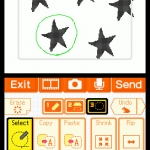
Select Tool Commands
While using the Select tool select an area and enter the following commands to enable the corresponding effect.
Paint Fill:
Blow into the microphone.
Rectangular Selection:
Hold Start + Select while touching the screen.
Nudge One Pixel:
Hold L and press the D-pad to nudge the selection by one pixel in that direction .You can also use the touchscreen to drag your selection.
Invert:
Hold L and press X to fill ALL empty pixels and empty all filled pixels.
Stamp:
Hold L and press A to stamp your selection on screen.
Quick Erase:
Press X. To delete everything, press X without the Select tool.
Advanced tools
On the Title screen there is a wrench in the corner, in case you didn't know, thats the options menu. On page 3 there is the advanced tools on/off, TURN IT ON!
PRESS "L" - In advanced tools almost EVERY tool has another use when you huld "L"
Layers- the 2 colors is replaced with layers, you can hide them, swtchs them or even only copy one and not the other. If you want to you can erase one layer or move it and not the other. Hold "L" to use the merge funtion to combine 2 layers
Select, copy, paste, and resize - the new added page to advanced tools! Select an area buy drawing around it. Copy or cut the area in the tool menu, pase with too menu. Blow on the mic to fill in a selected area with the current paint brush. Flip or resize your page with this tool kit.
Sounds - hold "L" and upload sounds from file of you DSi, mix sounds togeter, add sounds that last for only one page, or recor about a max of a minute of sound.
Try to find all the things you can do with advanced tools.
Flipnote Studio FAQs
We have 14 questions and 51 answers for Flipnote Studio. Check them out to find answers or ask your own to get the exact game help you need.
| Do you have to pay if you make an account? |
No It is free. But if you want to buy more color stars you do, but that is optional and I don't dO that |
| How do you put flipnotes on ds |
You know how when you click on a flipnote on the flipnote hatena site and on the bottom of the page it says back? .................well right next to it it says description click on that and on the bottom of that page it says save. Click that button and it might ask you if you want to confirm or something like that just click the most positive answer then once your done with that go off hatena and go to your studio and click view flipnote and there you go. |
| Is it possible to read at your own pace on the computer? If so, how? |
No it is not |
| OK... On flipnote how do you make the cherckered pattern and the light square pattern touch without making the black b.. |
Find a flip thats like it tnen copy that page and paste it to another page. Now you can do it. |
| You know, if u click on Flipnote Hatena, you get a lot of vids. But how you send one, or leave a comment ? Please help.. |
You need to create a Flipnote Hatena account, and link the account with your Nintendo DSi. |
Have a question for Flipnote Studio?
Flipnote Studio Walkthroughs
Reviews
Flipnote Studio is an easy to use, animation app for the Nintendo DSi. It's completely free, 0 poi..
By mrsolo3000
There is only one way to put this dsiware app. Super awesome. The graphics depend on how good you ..
By buuburn
Screenshots